
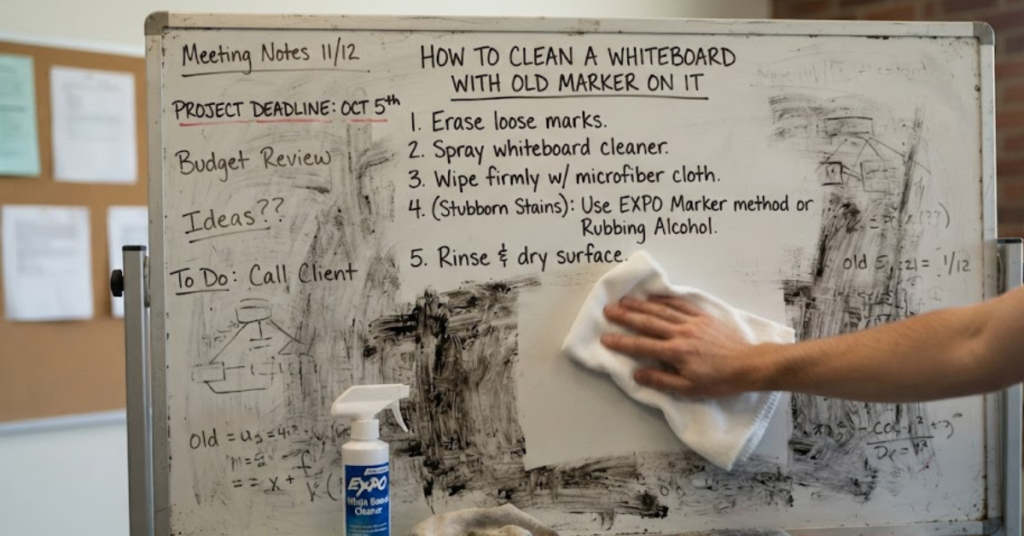

Whiteboards are an essential tool in classrooms, offices, and homes, but they’re only useful when they’re easy to write on and erase. Unfortunately, if marker ink is left on the surface for too long, it can become stubborn and leave behind ghosting or permanent-looking stains. The good news is that learning how to clean a whiteboard with old marker on it is easier than you might think—and in most cases, you don’t need expensive cleaning products.
In this guide, you’ll learn how to clean a whiteboard using simple household items, how to remove stubborn stains, clean a whiteboard that won’t erase, refresh a dirty whiteboard eraser, and keep your board in excellent condition for years to come.
Why Whiteboards Become Stained
Dry-erase markers are designed to wipe away easily, but several factors can cause ink to become difficult to remove.
Common causes include:
- Marker left on the board for days or weeks
- Using permanent markers by mistake
- Low-quality whiteboard surfaces
- Dirty whiteboard erasers
- Lack of regular cleaning
- Residue from old cleaning products
The longer ink remains on the surface, the more likely it is to leave behind visible stains or ghosting.
What You’ll Need
Most whiteboards can be cleaned with supplies you probably already have.
Gather the following:
- Dry-erase marker
- Microfiber cloth
- Whiteboard eraser
- Isopropyl alcohol (70% or higher)
- Soft paper towels
- Water
- Mild dish soap
- Spray bottle (optional)
Avoid abrasive scrubbers, steel wool, or harsh scouring powders, which can permanently damage the writing surface.
How to Clean a Whiteboard With Old Marker on It
If the marker has been sitting on the board for a long time, don’t panic. This simple method often works surprisingly well.
Step 1: Write Over the Old Ink
Take a fresh dry-erase marker and completely color over the old writing.
The fresh marker contains solvents that help dissolve dried marker residue.
Step 2: Erase Immediately
While the new ink is still wet, wipe the board using a clean whiteboard eraser or microfiber cloth.
In many cases, both the fresh and old marker ink will come off together.
Step 3: Repeat if Necessary
For heavily stained areas, repeat the process several times.
Each pass usually removes more residue.
Step 4: Finish With Isopropyl Alcohol
Dampen a microfiber cloth with isopropyl alcohol.
Gently wipe the remaining stains.
Allow the board to air dry before writing on it again.
How to Clean a Whiteboard Without Whiteboard Cleaner
Don’t have commercial whiteboard cleaner?
No problem.
If you’re wondering how to clean a whiteboard without whiteboard cleaner, try these safe alternatives:
- Isopropyl alcohol
- A mixture of water and a few drops of mild dish soap
- A microfiber cloth dampened with water for routine cleaning
Avoid glass cleaners containing ammonia unless the board’s manufacturer specifically recommends them, as repeated use may leave residue on some surfaces.
How to Clean a Whiteboard That Won’t Erase
Sometimes even fresh marker refuses to come off.
If you’re dealing with how to clean a whiteboard that won’t erase, follow these steps:
- Cover the writing with a fresh dry-erase marker.
- Erase immediately.
- Wipe with isopropyl alcohol.
- Dry with a clean microfiber cloth.
For severe ghosting, repeat the process until the surface is clean.
How to Clean a Whiteboard That Is Stained
Ghosting stains can make an otherwise good whiteboard look old.
To restore it:
Method 1: Alcohol Cleaning
Apply isopropyl alcohol to a microfiber cloth.
Gently wipe the stained areas.
Method 2: Mild Soap Solution
Mix:
- Warm water
- A few drops of dish soap
Wipe the board, then dry it thoroughly.
Method 3: Commercial Whiteboard Cleaner
If household methods don’t remove the stains, use a cleaner designed specifically for whiteboards according to the manufacturer’s directions.
How to Remove Permanent Marker From a Whiteboard
Accidentally used a permanent marker?
Fortunately, the fix is simple.
- Color directly over the permanent marker using a dry-erase marker.
- Allow it to sit for a few seconds.
- Wipe clean with a microfiber cloth.
- Finish with isopropyl alcohol if needed.
This technique works because the solvent in the dry-erase marker helps lift the permanent ink from the board’s surface.
How to Clean a Whiteboard Eraser
A dirty eraser simply spreads old marker instead of removing it.
If you’re wondering how to clean a whiteboard eraser, here’s the easiest method:
Felt Erasers
- Tap the eraser outside to remove loose dust.
- Use a vacuum with a brush attachment for deeper cleaning.
- For washable models, rinse with warm water and mild soap, then let them dry completely before use.
Microfiber Erasers
Wash according to the manufacturer’s instructions, usually with mild detergent and air drying.
Cleaning the eraser regularly helps keep your whiteboard cleaner.
Common Mistakes to Avoid
Avoid these habits that can shorten the life of your whiteboard:
- Using abrasive scrub pads
- Scratching the surface with sharp objects
- Leaving marker on the board for weeks
- Using permanent markers accidentally
- Cleaning with excessive water
- Using dirty erasers
Gentle maintenance preserves the board’s smooth writing surface.
How to Keep Your Whiteboard Clean Longer
Good habits reduce stains and make cleaning much easier.
Try these tips:
- Erase writing daily whenever possible.
- Use only high-quality dry-erase markers.
- Clean the board weekly with a microfiber cloth.
- Wash or replace dirty erasers regularly.
- Store markers with the caps tightly closed.
- Avoid using permanent markers near the whiteboard.
Routine maintenance prevents stubborn ghosting.
How Often Should You Clean a Whiteboard?
A simple cleaning schedule keeps your whiteboard in great condition.
| Cleaning Task | Recommended Frequency |
| Erase writing | After each use |
| Wipe with microfiber cloth | Weekly |
| Deep clean with alcohol | Monthly or as needed |
| Clean whiteboard eraser | Every 2–4 weeks |
Boards used daily in classrooms or offices may need more frequent cleaning.
Frequently Asked Questions
How do you clean a whiteboard with old marker on it?
Cover the old writing with a fresh dry-erase marker, erase it immediately, and wipe the surface with a microfiber cloth. If stains remain, clean the board with isopropyl alcohol.
Why won’t my whiteboard erase completely?
Old marker residue, ghosting, dirty erasers, or using the wrong type of marker can all make a whiteboard difficult to erase. Regular cleaning usually restores the surface.
Can I clean a whiteboard without whiteboard cleaner?
Yes. Isopropyl alcohol and a microfiber cloth are effective alternatives for removing marker residue. Mild dish soap and water can also be used for general cleaning.
How do you remove permanent marker from a whiteboard?
Write over the permanent marker with a dry-erase marker, erase it while it’s still wet, and finish by wiping the area with isopropyl alcohol if necessary.
How do you clean a stained whiteboard?
Use isopropyl alcohol on a microfiber cloth to remove ghosting and old marker stains. Repeat the process for stubborn areas or use a commercial whiteboard cleaner if needed.
How often should you clean a whiteboard eraser?
Clean your whiteboard eraser every two to four weeks, or more often if it becomes heavily coated with marker residue. A clean eraser improves erasing performance and reduces streaking.
Can using the wrong cleaner damage a whiteboard?
Yes. Abrasive cleaners, scouring pads, and certain harsh chemicals can damage the writing surface and make future stains more likely.
Conclusion
Knowing how to clean a whiteboard with old marker on it can save you from replacing an otherwise perfectly good board. In most cases, stubborn marks, ghosting, and dried ink can be removed using a fresh dry-erase marker, isopropyl alcohol, and a microfiber cloth—all without expensive specialty cleaners.
Whether you’re learning how to clean a whiteboard, figuring out how to clean a whiteboard that won’t erase, removing stains from a well-used board, cleaning a whiteboard eraser, or searching for how to clean a whiteboard without whiteboard cleaner, regular maintenance is the key. By erasing writing promptly, using quality markers, and giving the board a quick deep clean every few weeks, you’ll keep it looking bright, writing smoothly, and ready for your next lesson, meeting, or brainstorming session.